AI infrastructure · 2026
LabMax lets you manage a Proxmox server by asking for what you want in plain English. The AI writes a plan, and my code checks it, asks for approval, takes a checkpoint, and only then runs it. The AI never gets a direct path to the server.
Proxmox is a good hypervisor, but running one well means knowing a lot of commands, menus, and settings. I use tools like this all the time, and I have not found a simple, standard way for someone who isn't a specialist to do the same work safely.
I had the idea a while ago, and the architecture and the end goal were worked out before I wrote any of it. The design problem was how to let an AI do useful work on a server without trusting it with the server.

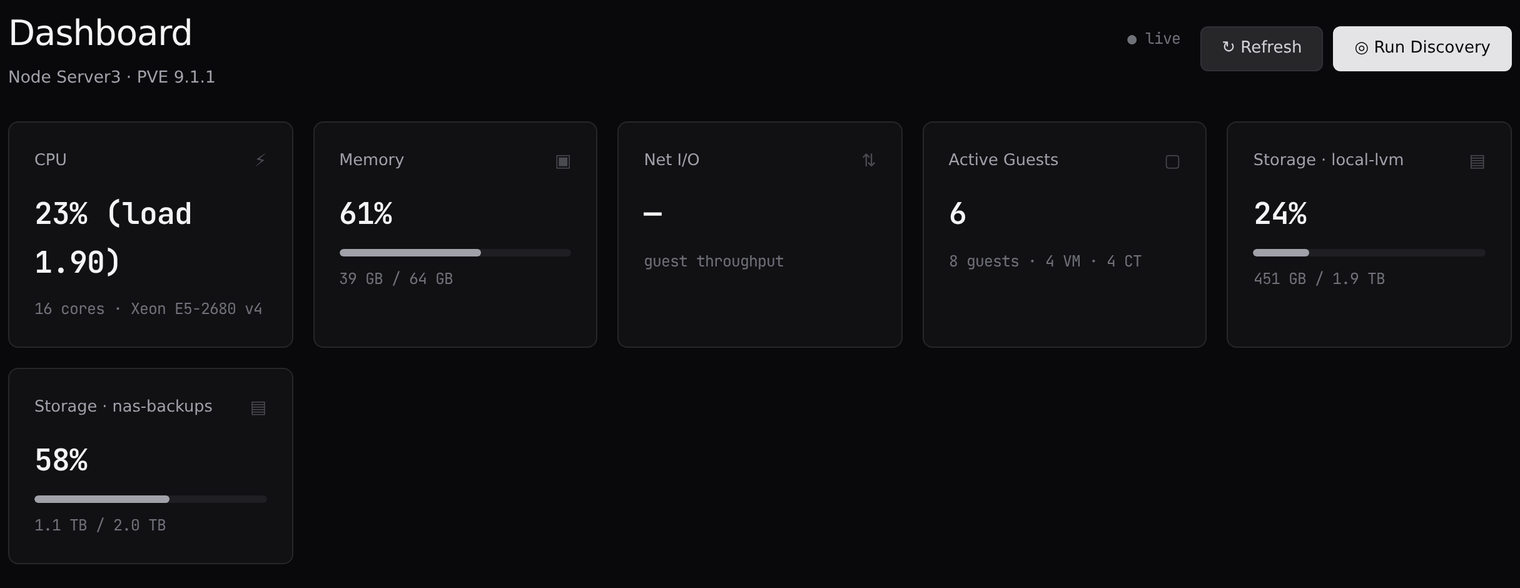
01 The dashboard. A live view of the host: 8 guests (4 VMs, 4 containers), 6 of them running.
You type a request like "spin up two Ubuntu servers, 8 GB each," and LabMax turns it into Proxmox actions. It already knows what is on the server, because it reads the hardware, storage, network, and existing guests ahead of time. That live picture is what the AI works from.
The AI only appears at the Plan step. Everything after it is ordinary code. It compares the plan to the server as it really is: ID conflicts, free storage, memory, and parameter limits. Problems come back as blockers or warnings, and you see the plan before anything runs.

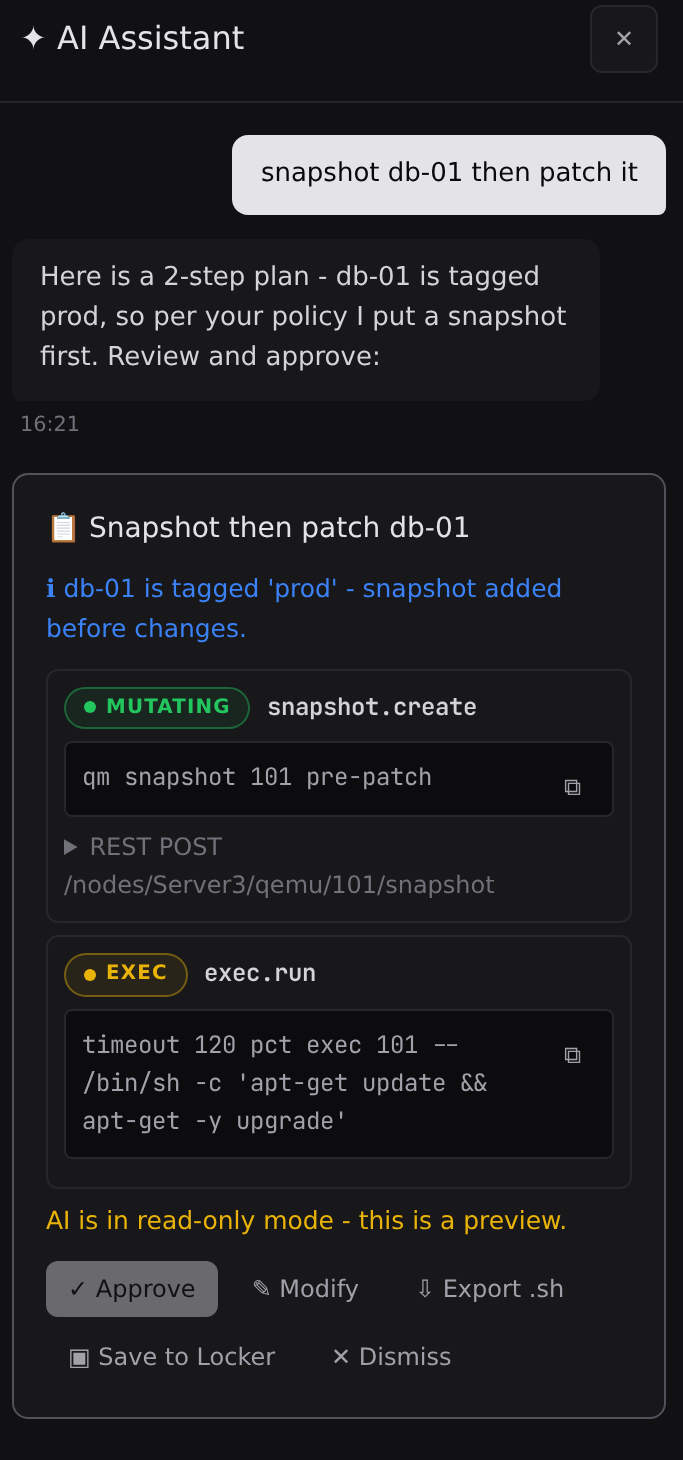
02 A plan waiting for review.
I asked it to snapshot db-01 and then patch it. It saw that db-01 is tagged prod, so it put a snapshot ahead of the patch, following a policy I wrote in plain language.
The card lists each step with the equivalent command. From there I can approve it, modify it, export it as a shell script, or save it to the Locker, where saved playbooks replay through the same checks.
The AI is in its read-only mode here, so this is a preview and nothing runs.
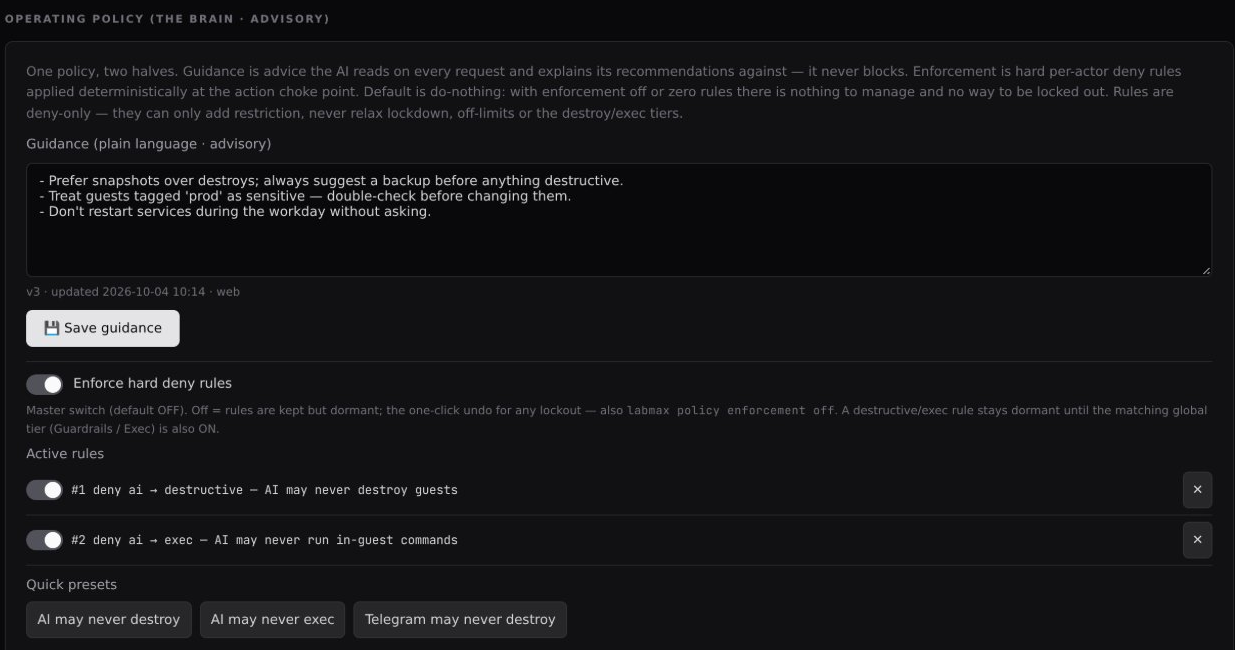
The AI is not working from memory. Each request is built from the live state of the server plus a small set of reference files: a map of the Proxmox API, sizing profiles from small to heavy, and a system prompt that tells it to answer with a plan in one fixed format. It also reads the short policy I keep in plain language, which is where the prod rule above came from.
A lot of the design went into controlling what the AI can do. The rules below are enforced by code at one checkpoint that every action passes through, whether it comes from the web page, the AI, Telegram, or the command line. Switching to a different interface does not get around a rule.
The AI only writes plans
It returns text in a fixed format and has no tools or direct connection to Proxmox. A reply that doesn't fit that format is rejected. It also starts in read-only mode, where it can preview but not run anything from chat.
One checkpoint for everything
The web page, Telegram, the command line, and the AI all go through the same function before anything runs. Each rule lives in one place, so no interface gets a looser version of it.
Destructive actions start off
Deleting guests, snapshots, backups, or stored content, and rolling back, are blocked until I switch that tier on. Deleting a guest also means typing its exact name, and the server rechecks the name instead of trusting the browser.
Lockdown and off-limits guests
One switch freezes every change while read-only discovery keeps running. Individual guests can be marked frozen or no-destroy, and that holds even with the destroy tier on. In the screenshots, db-01 is marked no-destroy as the production database.
A second approval
With the approval queue on, destructive actions and commands run inside a guest wait for someone to approve them, and they expire after 60 minutes by default. Approving re-runs every check against the current state, so an approval never skips a rule.
Separate rules for the AI
I can deny things to the AI while still allowing them for me. Two rules are set in the screenshots: the AI may never destroy guests, and may never run commands inside them. These rules can only add restrictions, never loosen the ones above.
Commands inside guests are their own tier
Running a command inside a guest has its own switch, off by default, plus a list of blocked command patterns. The pattern list is a backstop and not a sandbox, so the switch and the approval queue do the main work.
Control over what the AI sees
A setting scrubs IP addresses, MAC addresses, and secrets from the prompt before it goes to the outside model. The AI runs on my Claude subscription login, and any stray API key in the environment is stripped so it can't turn into metered usage.
03 Operating policy. Plain language guidance the AI reads on every request, and hard deny rules enforced in code.
No default password
LabMax refuses every login until a web password exists. Passwords are hashed, five wrong tries lock the account for 15 minutes, and sessions expire after 12 hours by default.
Protected requests
Session tokens are stored hashed, and every request that changes something has to carry a matching CSRF token.
HTTPS built in
From the settings page I can generate a self-signed certificate or import my own. If the certificate is ever missing or invalid, the gateway falls back to HTTP so I can't lock myself out. Past a LAN, the recommendation is a reverse proxy with a real certificate.
Encrypted secrets
Tokens and passwords are encrypted at rest with a key that stays on the machine. They are never logged or sent back to the browser.
Telegram only dials out
The bot opens no inbound port. It polls Telegram, answers only chats on an allow-list, and its token is verified before it is stored.
The host stays read-only
Discovery reads the Proxmox host over SSH and never changes it, and LabMax does not run host updates. The host's SSH key is pinned, so a changed key is rejected.
Least privilege
LabMax talks to Proxmox with a dedicated API token whose role lists only the permissions it needs. The four background services run as hardened systemd units with restricted file access.
A record and a way back
Every change is checkpointed before and after, and an audit log records each action. Rollbacks go through the lockdown, off-limits, and policy checks too.
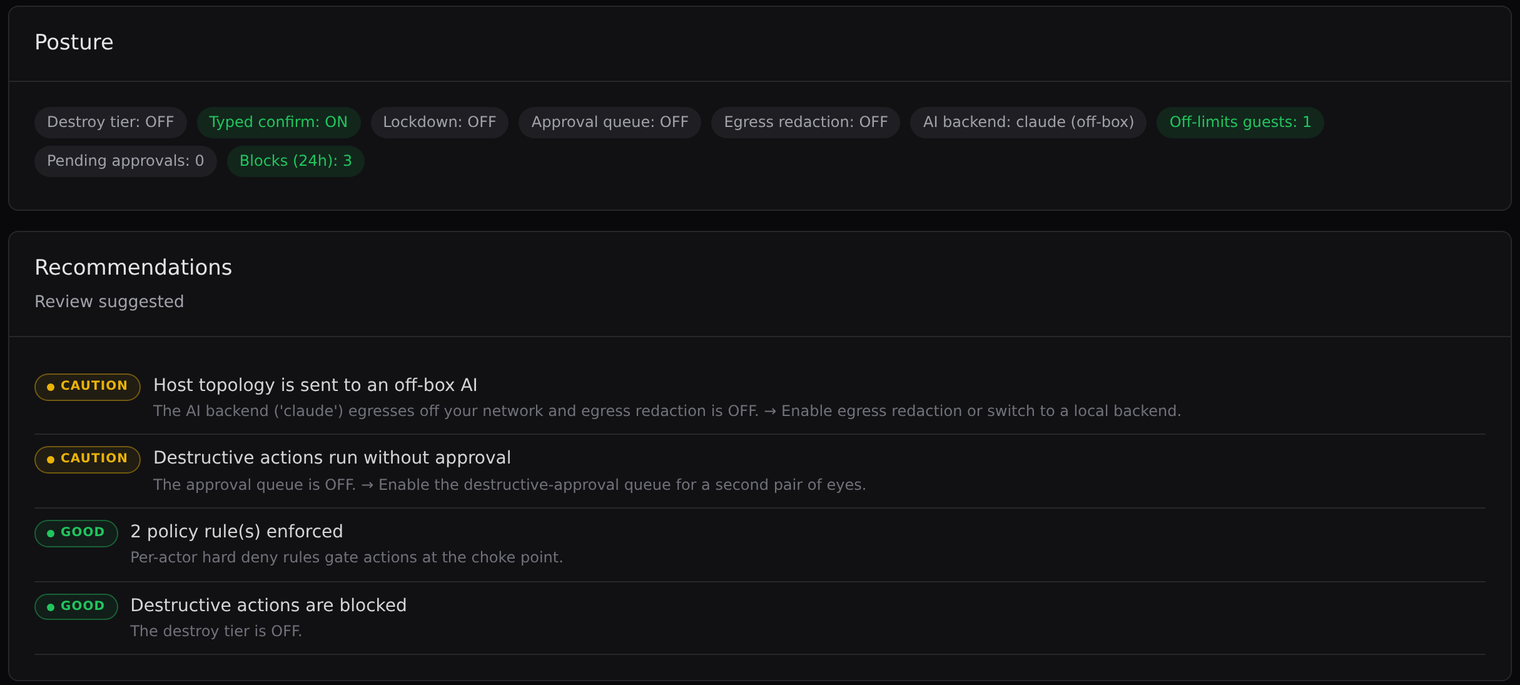
The Security page shows the whole posture on one screen and gives recommendations. Those come from fixed checks written in code, with no AI involved. In these screenshots it marks my lab as review suggested: egress redaction and the approval queue are both off, and it says so.

04 Posture and recommendations.

05 Recent decisions. The AI was denied a guest destroy by rule 1, a snapshot ran from the web, and a command was stopped because the exec tier is off.
The idea, the architecture, and where it was headed were mine. I built it with Claude, working in a Claude project that held the Proxmox documentation and the LabMax code, and LabMax itself uses Claude as its AI engine through the Claude Code command line.
The code is organized into numbered phases, and the safety features arrived as separate ones: guardrail tiers, lockdown and off-limits, the approval queue, per-actor policy, the security overview, and log and egress privacy. The ones that block or park actions all sit at the same checkpoint, so each applied to every interface as soon as it existed.
LabMax is at version 1.0.0, and the screenshots on this page come from a single Proxmox host. This is what is built and what is not.
I left a local model out of the first version on purpose. The AI engine sits behind one interface, so adding one later would not touch the rest of the code. MCP is also absent on purpose, since the model never holds a tool surface. Adding it would be a deliberate decision.